 TextingReel
What's in the package
app/ | Electron main process (window, files, render queue, first-run setup), a secure preload bridge, and the interface in plain HTML, CSS and ES modules |
engine/ | Turns a project (JSON) into a video composition: timing, layout for every aspect ratio, the four chat styles, audio mixing, and a small animation runtime |
service/ | Render queue with progress and cancel, FFmpeg and renderer setup, batch import from CSV, text scripts and JSON |
templates/ | 22 chat templates and batch examples |
tools/ | Automated tests plus generators for templates, the icon, sounds, screenshots and license notices |
docs/, documentation/ | Build guide, project format, batch formats, and an HTML user guide with screenshots |
| Installer | A prebuilt Windows installer, plus the electron-builder config to build your own |
Tech stack
- Electron 44 with context isolation, a sandboxed renderer and a narrow IPC bridge
- HyperFrames (Apache-2.0) renders HTML compositions to video through headless Chrome and FFmpeg
- No front-end framework and no bundler. Plain JavaScript you can read top to bottom
- No paid APIs. Everything renders locally, so your product has no running costs
- FFmpeg is downloaded on first run instead of bundled, which keeps GPL code out of your installer
- Automated tests for the engine (22 layout combinations), all templates, and the render queue.
npm auditreports 0 vulnerabilities at release.
How a render works
- Project: the chat is stored as plain JSON (a
.treelfile): contact, messages, style, canvas, timing and audio settings. - Schedule:
engine/schedule.jsworks out when each typing indicator, keystroke, bubble and pause happens, based on message length and the chosen speed. - Composition:
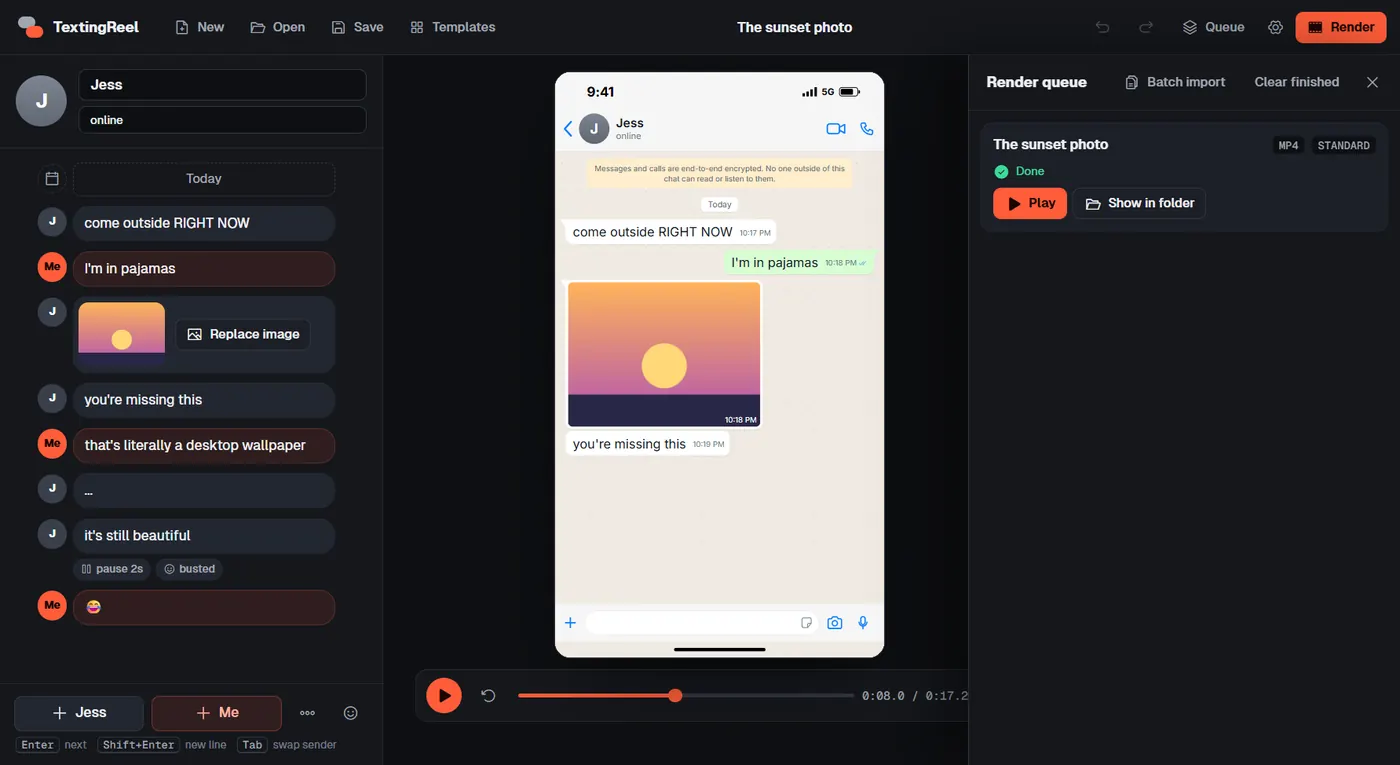
engine/build.jswrites an HTML page for the chosen style and aspect ratio, copies fonts, sounds and images, and adds a small seekable animation timeline. The same page drives the live preview in the app, which is why the preview matches the export. - Render: the render service runs HyperFrames, which captures the page frame by frame in headless Chrome and encodes it with FFmpeg to MP4, WebM or MOV, mixing in the message sounds and music.
- Output: the finished video and a cue sheet are written to the output folder. Batch jobs repeat this for every chat in a CSV, text script or JSON file.
Security and privacy by design
- No accounts, analytics, telemetry or update checks. HyperFrames telemetry and update checks are switched off in code.
- The renderer runs sandboxed with context isolation, and only a narrow list of IPC calls is exposed to the interface.
- The window cannot open popups or navigate away from the app.
- The only network access is the optional one-time download of FFmpeg and the headless renderer.
Build it
npm install
npm start          # run the app
npm run dist       # build the Windows installer
Requires Node.js 22 or newer. Code signing is optional and documented.
Easy to customise
| Change | Where |
|---|---|
| Name, icon, accent color | package.json, electron-builder.yml, build/icon.ico, CSS variables |
| Translate the interface | Every string is in app/renderer/js/strings.js |
| Add a chat style | One module in engine/styles/, documented in docs/ENGINE.md |
| Add templates | Drop .treel files into templates/projects/ |
| Change the timing feel | Constants in engine/schedule.js |
| Automate rendering | node engine/cli.js chat.treel out --render |
Full source code, installer and documentation for a one-time $12.99. License terms are on the Gumroad page.
Get TextingReel $12.99Ideas for what to build
- A branded chat video app for your own audience or clients
- An internal tool that turns support conversations or scripts into short videos
- A batch pipeline that renders daily text stories from a spreadsheet
- New chat styles, languages or export presets for a niche
Open source components
TextingReel builds on HyperFrames (Apache-2.0), Electron (MIT), the Inter and Geist fonts (SIL Open Font License) and Phosphor Icons (MIT). A complete third-party notice file with every license text is included.